
From the Devcon 8 volunteer guide. Roles work the same way at every Devcon, so this is how the job is done. Anything tied to the Lisbon venue, the schedule or names is marked as still to be confirmed.
The basics
Registration is one of the most important roles at the conference. Attendees form their first impression of Devcon at your desk. Check in at the Volunteer Check-In desk with the Coordination Support team at your designated time, as for every role. Where the desk and Volunteer HQ are at CCL is still to be confirmed.
Rehearse the script below before the day. Say it out loud to a mirror, or to a friend. You will practise scanning at the in-person training before the event.
Your Lead hands you a set number of wristbands at the start of the shift and counts them at the end. None may go missing.
Registration runs in the ticketing area: the booths where attendees scan their ticket on arrival. At Devcon 8 there was a pre-registration day before opening, and the booths ran all week. The team needs more volunteers in the first days and gets smaller as the week goes on, so you may later be moved to an area that needs more attention.
What every attendee leaves with
- A wristband (check the ticket type first).
Your station
You have a station at the Registration desk. Keep it neat, tidy and well-stocked. Tell your Lead when you are running low on either of these.
- Devcon wristbands. General Attendee and Speaker bands are different, so check the ticket type first. The Devcon 9 wristband designs are new for Lisbon and will be shown at training.
- Scanning device. The same scanners as at Devcon 8. It should already be logged in and ready to scan. Ask your Lead if you need help.

Welcome to Devcon! So glad you're here. I'm [your name], and I'll get you set up.
This part matters most, so say it clearly and slowly: This is your wristband for the week. If you lose it, we cannot let you back in, and you will need to pay for a new one.
Please keep it on your wrist all week. Any questions before you head in? Enjoy the week!
At the desk
You are the first face attendees see, so greet everyone with a smile.
- Welcome them Greet them and ask to see their Devcon ticket.
- Scan the ticket Press the orange button on the side of the device. The laser comes from the top of the device. If an alert says "CHECK ID!", ask for their ID and match it against the name on the ticket. You can scan a second time if the modal disappears, but it will scan yellow. That is fine.
-
Wait for green
Green means go. Any other colour, send them to the Help Desk.
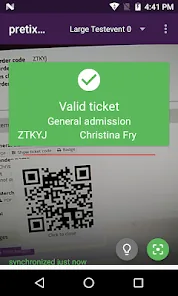
A green Valid ticket confirmation - Fit the wristband Put it on their wrist, not tight. Ask them to stack two fingers' width on the wrist as you tighten it, then say the wristband warning from the desk script.
Attendee scenarios
General admission ticket (no ID required)
The easiest flow. Look for green in the scanner and put the wristband on. If it scans yellow or red, point them to the Help Desk.
ID check required
Ask to see ID and check it against the ticket as it pops up. This applies to discounted tickets that depend on who you are, such as local resident, student and youth tickets. Which Devcon 9 tickets need an ID check is still to be confirmed.
Youth tickets: a parent wants to buy a ticket for their child
Point them to the Devcon website.
Youth tickets: a young person arrives alone
Tell them to go to the ticket shop. They will need to fill out the form and get their parent's consent.
Day Pass, Exhibitor ticket, or a child without a ticket
Send them to the Help Desk.
Troubleshooting
They cannot find their ticket
Have them search their email for their Devcon ticket confirmation. If it still does not turn up, send them to the Help Desk.
They lost their wristband
Send them to the Help Desk.
Any colour other than green on the scanner means the Help Desk.
Your team
Each area has two Volunteer Leads, one for the morning shift and one for the afternoon, and a lead from the Devcon team for the workstream. Your Volunteer Lead is your first point of contact on shift. Names for Devcon 9 are TBC.
Still to confirm for Lisbon
Nothing here is guessed. These stay marked until the Devcon team confirms them.
- Where the registration desks sit at CCL.
- Whether there is a pre-registration day before 12 October, and its date.
- What the Devcon 9 wristbands look like for each ticket type.
Plan your commute with the shift commute plan, check what to carry, and save the emergency numbers.